
In this article:
- Overview
- Setting Up Your Data Feed
- Understanding Your Data Feed Files
- How to Access the Data
- Sample Data
- Recommended Data Model
- Data Dictionary
Overview
A Data Feed reliably and automatically extracts data from Quantum Workplace for external reporting.
Use this article to understand how to set up and get the most value from a Data Feed.
Is a Data Feed Right for Me?
The Data Feed is for data professionals. If you manage a data warehouse or repository for business intelligence reporting, then you can use it to make Quantum Workplace data available with other business data or as a stand-alone data mart.
Data are exported in flat files, as often as once a day, and accessed via SFTP and can be incorporated into your ETL pipeline.
Data is exported across multiple files that can be connected using shared identifiers. Most files use Quantum Workplace's UserID to associate records with employees. The Users file also contains employee information provided by your organization, including employee IDs that can be used to connect Data Feed records with your internal systems.
Some files, such as Demographics_PointInTime, use different identifiers to connect related records. Additionally, survey and feedback confidentiality settings may prevent certain data from being associated with individual employees.
Quantum Workplace will not identify confidential survey or feedback data. Learn more about confidential surveys and confidentiality settings.
If you plan to analyze only Quantum Workplace data but prefer to use your own data visualization / BI tool, then you can use Data Feed files to create a data mart of Quantum Workplace data.
Use Cases
Just some of the use cases for a Data Feed are given for inspiration below:
Describing the Impact of Employee Engagement
- What is the impact of employee engagement on performance?
- What is the impact of employee engagement on goals?
- What is the impact of employee engagement on revenue/safety/billable hours?
Focusing & Monitoring Your DEI Initiatives
- Do underrepresented groups have a different employee experience?
- Do underrepresented groups term at a different rate than most?
- Do our efforts to address areas of concern have the desired impact?
Ensure Employee Compliance & Effectiveness
- Are employees receiving the appropriate feedback on time?
- When employees receive feedback, does it positively affect goal progress?
- When employees receive feedback, does it positively affect safety?
Setting Up Your Data Feed
As a Quantum Workplace admin, to access Data Feed settings:
- Click and expand Global Settings in the left-hand navigation menu
- Click Integrations
- Click the Data Feed card
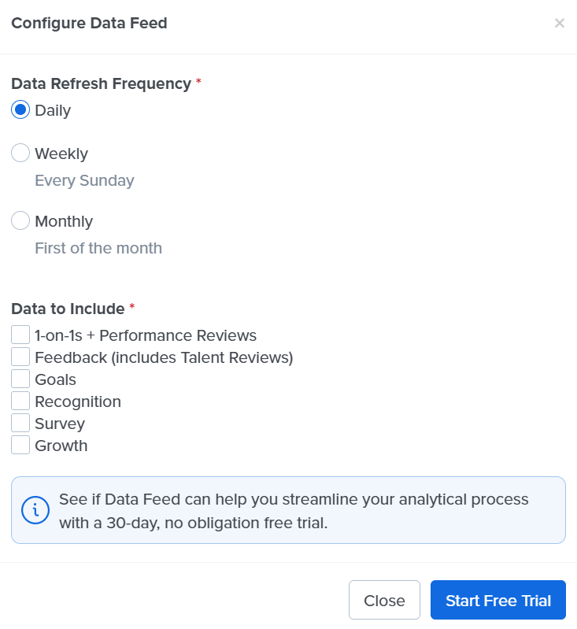
On the Data Feed page, you can configure your Data Feed for a nightly, weekly, or monthly refresh frequency. You can also specify which data you would like to include: 1-on-1s, Feedback, Goals, Recognition, Growth, and Survey data.
Note: Talent Review data is collected via a specialized Feedback cycle and can be found under Feedback; Performance Review data is collected via a specialized 1-on-1 cycle.
When data are refreshed, they include all historical data, not just the new data since the last refresh.
How to Access the Data
Data Feed files are accessed via SFTP on a server provided by Quantum Workplace. This is the same server used for HRIS integration “sftp.quantumworkplace.com”.
Please email our support team for help with SFTP information.
Data Feed files will be in your “/outbound/DataFeed/” directory.
Understanding Your Data Feed Files
Data Feed can include descriptive files that explain the exported files, their columns, and how related data connects. Use these files to help build reports, connect datasets, or provide context to AI tools.
Sample Data
Download sample Data Feed files to explore the available data, review file formats, and understand how records can be connected for reporting.
The sample files can help you plan your data model before setting up your own Data Feed. For a description of the fields included in each file, refer to the Data Dictionary below.
Click here to download sample data.
Recommended Data Model
We recommend using a reverse star schema to organize Data Feed files for reporting and analysis.
The Users file serves as the primary connection between most Data Feed files through Quantum Workplace's UserID. It also includes the employee ID provided by your organization, which allows you to connect Quantum Workplace data with your internal reporting systems.
Some files use different relationships. For example, Demographics_PointInTime connects to SurveyGoalpostRequest and SurveyGoalpostResponse using ConversationParticipantID rather than UserID.
When building your data model, use the identifiers documented in the Data Dictionary to establish the appropriate relationships between files. Confidentiality settings may also limit the availability of user-level identifiers.

Data Dictionary
Included in the Data Dictionary:
- DataGuide_Files
- DataGuide_Columns
- FeedbackRequest
- FeedbackResponse
- Goals
- GoalNotes
- GoalRoles
- GoalUpdates
- GoalProgress
- GoalKeyResultProgress
- GrowthCycle
- GrowthPlan
- GrowthPlanArea
- OneOnOneRequest
- OneOnOneResponse
- PerformanceReviewGoals
- PerformanceReviewRequest
- PerformanceReviewResponse
- RecognitionComments
- RecognitionPostLikes
- RecognitionPosts
- RecognitionRecipients
- SurveyGoalpostRequest
- SurveyGoalpostResponse
- Demographics
- Demographics_PointInTime
- Users
DataGuide_Files
One row per Data Feed file. Describes what each file holds.
- FileName
String
Name of the Data Feed file, for example Goals.csv. Joins to _DataGuide_Columns.FileName. - Module
String
The product area the file belongs to, for example User, Feedback, Goal, Growth, OneOnOne, Recognition, or Survey2. - ModuleVersion
Numeric
Version of the module’s file layout. - FileDescription
String
Describes what the file contains, what one row represents, and how to join it to other files. - ColumnsListed
String
True when the file’s columns are described in _DataGuide_Columns.
DataGuide_Columns
One row per column of each Data Feed file.
- FileName
String
The file the column belongs to. Joins to _DataGuide_Files.FileName. - ColumnOrder
Numeric
Position of the column in the file, starting at 1. - ColumnName
String
Name of the column. - DataType
String
Source data type, for example bigint, nvarchar(500), uniqueidentifier, or date. - IsNullable
String
True when the column can be empty. - Description
String
Describes what the column holds. - ValueList
String
The values the column can take when it has a fixed set. Empty otherwise. - JoinsTo
String
The file and column this column connects to, when applicable.
FeedbackRequest
This contains data related to the Feedback feature in Quantum Workplace. Specifically, it contains information about those who were requested to provide Feedback. GiverUserID is NULL if the Feedback responses are anonymous unless the provider is the manager of the recipient.
- FeedbackRequestID
Numeric
Identifies a particular Feedback Request. - CycleID
Numeric
Identifies a Feedback cycle, which is a client-defined group of Feedback templates.
- CycleName
String
The name given to the Feedback cycle. - TemplateID
String
Identifies a particular Feedback template. - TemplateName
String
The name given to the Feedback template. - ConversationTitle
String
The name given to an instance of feedback. Users can, but are not required to, use the CycleName or TemplateName as the Title. - ConversationID
Numeric
Identifies a particular Feedback instance. - ConversationParticipantID
Numeric
Identifies a particular participant in a Feedback instance. - ParticipantTypeID
Numeric
Describes if the participant is Self (1), Manager (2), Provider (3), Peers (4), Direct Reports (5), or Administrator (6).
- StatusDetail
String
Describes the current progress of a Feedback instance. - GiverUserID
GUID
The Quantum Workplace UserID for the employee giving the Feedback. - RecipientUserID
GUID (Users.UserID)
The Quantum Workplace UserID for the employee receiving the Feedback. - Created
Date
The date the Feedback was created. - ProviderShared
Date
The date the Feedback was shared (if applicable). - FeedbackProviderTemplateSegmentName
String
Name of the template segment the feedback giver belongs to, such as Manager. The giver’s identity is shown for the Manager segment even when the feedback is confidential.
FeedbackResponse
This contains data related to the Feedback feature in Quantum Workplace. Specifically, it contains responses to Feedback that was requested. UserID is NULL if the Feedback responses are anonymous unless the provider is the manager of the recipient.
-
FeedbackGiverResponseID
Numeric
Identifies a particular Feedback Response. - CycleID
Numeric
Identifies a Feedback cycle, which is a client-defined group of Feedback templates. - ConversationTitle
String
The name given to an instance of feedback. Users can, but aren't required to, use the CycleName or TemplateName as the Title. - ConversationID
Numeric
Identifies a particular Feedback instance. - GiverConversationParticipantID
Numeric
Identifies a particular Feedback giver in a Feedback Instance. - UserID
GUID (Users.UserID)
The Quantum Workplace UserID for the employee giving the Feedback.
- FeedbackProviderTemplateSegmentName
String
Describes the template segment the Feedback provider belongs to.
- GuestEmailAddress
String
The email address for the provider if the Feedback provider is not logged into Quantum Workplace, but instead provides Feedback using a link sent to them.
- ProviderStatusDetail
String
Describes the current progress of a Feedback provider, i.e. Not Started, Started, Shared, Finalized, Opt Out, or Pending Approval.
- ProviderCreated
Date
The date the provider was assigned to the conversation.
- ProviderShared
Date
The date the provider shared the Feedback, if applicable.
- QuestionID
Numeric
Identifies the question used in the Feedback conversation.
- QuestionText
String
Describes the question used in the One-on-One conversation.
- AnswerCode
Numeric
The number value assigned to a response, if applicable.
- AnswerCodeText
String
Describes the number value assigned to a response, if applicable.
- FreeFormAnswerOrCommentText
String
The text entered by the One-on-One participant, if applicable.
Goals
This contains data related to the Goals feature in Quantum Workplace. Specifically, it contains goal-level data.
- GoalsID
Numeric (GoalRoles.GoalsID)
Identifies a particular goal. - GoalName
String
Describes a particular goal. - CreateDate
Date
The date the goal was created. - DueDate
Date
The date the goal is due. - CompleteDate
Date
The date the goal was completed, if applicable. - GoalType
String
Describes the goal type, i.e. Individual, Organizational, Departmental, or Developmental. - PrivacyLevel
String
Describes the privacy (to other users) level, i.e. Private or Public. - GoalStatus
String
Describes the status of a goal. May have a value of Draft, Active, or Abandoned. - GoalCategory
String
Describes the goal category if one is assigned, will be NULL if not assigned. - OnTrackStatus
String
The goal's current on-track status: None, OnTrack, AtRisk, or OffTrack. - Description
String
The description of the goal. - AlignedGoalID
Numeric
Identifies the parent goal, if the goal is aligned to another goal. - AlignedGoalName
String
The name of the parent goal, if applicable. - StartDate
Date
The start date specified for the goal.
GoalNotes
One row per note written on a goal outside of a check-in. Join to Goals.csv on GoalsID. Comments entered during a check-in are included in GoalProgress.csv. This file contains free text that may include personal data.
- GoalsID
Numeric (never empty)
The goal the note was written on. Joins to Goals.csv: GoalsID. - PostID
Numeric (never empty)
Unique ID of the note posted on the goal. - PostDateCreated
Date/Time (never empty)
When the note was written. - ResponseValue
String
The text of the note. Line breaks are replaced by spaces. May contain personal data. - UserID
GUID
The user who wrote the note. Joins to the Users file: UserID.
GoalRoles
This contains data related to the Goals feature in Quantum Workplace. Specifically, it contains data that describes a User’s association to a goal, i.e., Owner, Contributor, or Follower.
- GoalRolesID
Numeric
Identifies a goal-role combination. -
GoalsID
Numeric (Goals.GoalsID)
Identifies a particular goal. - GoalName
String
Describes a particular goal. - GoalRole
String
Describes the User's role on the particular goal, i.e. Owner, Contributor, Follower. - UserID
GUID
The Quantum Workplace UserID for the goal-role combination.
GoalProgress
This contains data related to the Goals feature in Quantum Workplace. Specifically, it is a log of every addition or updates to the on-track status of a goal, independent of any updates to key results.
- GoalsID
Numeric (Goals.GoalsID)
Identifies a particular goal. - PreviousOnTrackStatus
String
Contains the goal status immediately preceding the current progress update. - NewOnTrackStatus
String
Contains the goal status provided during a progress update. - ProgressUpdateID
Numeric
Identifies a goal progress update. - ProgressUpdateDateCreated
Date
The date and time a progress update was created. - ResponseValue
String
The comment entered during the check-in. Line breaks are removed. Empty when no comment was entered. May contain personal data. - UserID
GUID
The user who wrote the comment in ResponseValue. Always populated when there is a comment; usually empty when there is none. This is not always the person who made the check-in. Joins to the Users file: UserID.
GoalKeyResultProgress
This contains data related to the Goals feature in Quantum Workplace. Specifically, it is a log of every addition or update to the goal of a key result, independent of any updates to the overall goal progress.
- GoalsID
Numeric (Goals.GoalsID)
Identifies a particular goal. - KeyResultID
Numeric
Identifies a user-defined important result (key result) that is tracked in the Quantum Workplace Goals feature. - KeyResultName
Numeric
The name of a Key Result, defined by the user, associated with a goal. - ProgressUpdateID
Numeric
Identifies a goal progress update. If a key result is updated without updating the goal progress, then ProgressUpdateID is 0.
- KeyResultStartingProgress
Numeric
The initial progress of the key result, specified by the user who created the key result. - KeyResultCurrentProgress
Numeric
The progress provided during an update of the key result. - KeyResultTargetProgress
Numeric
The target progress for a key result, specified by the user who created the key result. - KeyResultCreateDate
Date
The date a key result was created. - KeyResultProgressDateCreated
Date
The date of a key result was updated. - UserID
GUID (Users.UserID)
The Quantum Workplace UserID for the employee that owns the Key Result, if applicable.
GrowthCycle
One row per growth cycle, a period in which people build growth plans. Deleted cycles are not included.
- organization_id
Numeric (never empty)
ID of the organization. The same on every row. - growth_cycle_id
GUID (never empty)
Unique ID of the growth cycle. Joins to GrowthPlan.csv: growth_cycle_id. - cycle_name
String (never empty)
Name of the growth cycle. - launch_date
Date/Time (never empty)
When the cycle launched. - share_by_date
Date/Time
The date by which plans should be shared. Empty when the cycle has no share-by date. - end_date
Date/Time (never empty)
When the cycle ends.
Next: add GrowthPlan to Understanding the Intelligence Data Feed. About 4 minutes.
| Where | Exact update |
|---|---|
| Data Dictionary linked list | Add GrowthPlan after GrowthCycle, linked to the new heading. |
| Dictionary body | Add the section below immediately after GrowthCycle. |
GrowthPlan
One row per user growth plan. Join to GrowthCycle.csv on growth_cycle_id and to the Users file on user_id, which corresponds to UserID in the Users file. If a plan’s owner is removed from its cycle or the cycle is deleted, the plan remains in this file with an empty growth_cycle_id.
- organization_id
Numeric (never empty)
ID of the organization. The same on every row. - user_id
GUID (never empty)
The user who owns the plan. Joins to the Users file: UserID. - growth_cycle_id
GUID
The cycle the plan belongs to. Empty when the owner was removed from the cycle or the cycle was deleted. Joins to GrowthCycle.csv: growth_cycle_id. - growth_plan_id
GUID
Unique ID of the plan. Joins to GrowthPlanArea.csv: growth_plan_id. - date_added_to_cycle
Date/Time
When the owner was added to the cycle. Empty when growth_cycle_id is empty. - growth_plan_status
String (never empty)
Status of the plan. Values are set by the Growth product and are not decoded in this feed. - shared_at
Date/Time
When the plan was shared. Empty if it has not been shared. - career_vision_status
String (never empty)
Status of the plan’s career vision section. Values are set by the Growth product and are not decoded in this feed. - growth_area_count
Numeric
Number of growth areas on the plan. - plan_last_updated
Date/Time
When the plan was last changed.
GrowthPlanArea
One row per growth area on a plan. Deleted and archived areas are not included. Join to GrowthPlan.csv on growth_plan_id.
- organization_id
Numeric (never empty)
ID of the organization. The same on every row. - growth_plan_area_id
GUID (never empty)
Unique ID of the growth area. - growth_plan_id
GUID (never empty)
The plan the area belongs to. Joins to GrowthPlan.csv: growth_plan_id. - growth_area_title
String (never empty)
Title of the growth area. May contain personal data. - level
Numeric
Numeric level selected for the growth area. Its name is provided in level_title. - level_title
String
Name of the level selected for the growth area. - theme
String
The theme the growth area falls under. - is_custom_area
Numeric
1 when the area was written by the user or the organization rather than chosen from the standard list.
OneOnOneRequest
This contains data related to the One-On-One feature in Quantum Workplace. Specifically, it contains information about One-On-Ones that were created.
- OneOnOneRequestID
String
Identifies a particular scheduled One-On-One - CycleID
Numeric
Identifies a One-On-One cycle, which is a client-defined group of One-On-One templates. - CycleName
String
The name given to the One-On-One cycle. - TemplateID
Numeric
Identifies a particular One-On-One template. - TemplateName
String
The name given to the One-On-One template. - ConversationTitle
String
The name given to a One-On-One template. Users can, but aren't required to, use the CycleName or TemplateName as the Title. - ConversationID
Numeric
Identifies a particular One-On-One instance. - ParticipantType
String
Describes if the participant is the Employee or the Facilitator of the One-On-One. - CreateDate
Date
The date the One-On-One instance was created. - ConversationParticipantID
Numeric
Identifies a particular participant in a One-On-One instance. - UserID
GUID (Users.UserID)
The Quantum Workplace UserID for the users participating in the One-On-One. - ProgressStatus
String
Describes the status of the participant of the One-On-One, i.e. Not Started, Started, Shared, or Finalized. - DateShared
Date
The date the One-On-One was shared, if applicable. - LastChangeDate
Date
The date of the last update to the One-On-One ProgressStatus - ShareDueDate
Date
The date the One-On-One is due to be shared, if applicable. - FinalizeDueDate
Date
The date the One-On-One is due to be finalized, if applicable. - FinalizeDate
Date
The date the One-On-One was finalized, if applicable.
OneOnOneResponse
This contains data related to the One-On-One feature in Quantum Workplace. Specifically, it contains responses, from both the Employee and the Facilitator, gathered during the One-On-One.
- OneOnOneResponseID
Numeric
Identifies a particular response during a One-On-One. - CycleID
Numeric
Identifies a One-On-One cycle, which is a client-defined group of One-On-One templates. - CycleName
String
The name given to the One-On-One cycle. - TemplateID
Numeric
Identifies a particular One-On-One template. - TemplateName
String
The name given to the One-On-One template. - ConversationTitle
String
The name given to a One-On-One instance. Users can, but aren't required to, use te CycleName or TemplateName as the Title. - ConversationID
Numeric
Identifies a particular One-On-One instance. - ConversationParticipantID
Numeric
Identifies a particular participant in a One-On-One instance. - ParticipantType
String
Describes if the participant is the Employee or the Facilitator of the One-On-One. - UserID
GUID (Users.UserID)
The Quantum Workplace UserID for the users participant in the One-On-One. - DateShared
Date
The date the One-On-One was shared, if applicable. - QuestionID
Numeric
Identifies the question used in the One-On-One conversation. - QuestionText
String
Describes the question used in the One-On-One conversation. - AnswerCode
Numeric
The number value assigned to a response, if applicable. - AnswerCodeText
String
Describes the number value assigned to a response, if applicable. - FreeFormAnswerorCommentText
String
The text entered by the One-On-One participant, if applicable.
PerformanceReviewGoals
This contains goal-related data associated with Performance Reviews, including goal ratings and employee and facilitator responses.
- ConversationID
Numeric
Identifies the Performance Review instance. - GoalID
Numeric
Identifies the goal associated with the Performance Review. - GoalRatingText
String
The rating text associated with the goal. - EmployeeResponseValue
String
The employee's response value for the goal. - EmployeeResponseText
String
Text the employee entered with the goal rating. Empty when no text was entered. May contain personal data. - EmployeeOptionText
String
The text associated with the employee's selected response option. - FacilitatorResponseValue
String*
The facilitator's response value for the goal. - FacilitatorResponseText
String
The facilitator's written response for the goal. - FacilitatorOptionText
String
The text associated with the facilitator's selected response option.
PerformanceReviewRequest
This contains information about Performance Reviews, including review cycles, templates, participants, progress statuses, deadlines, and ratings.
- PerformanceReviewRequestID
Numeric
Identifies a particular Performance Review request. - CycleID
Numeric
Identifies the Performance Review cycle. - CycleName
String
The name of the Performance Review cycle. - TemplateID
String
Identifies the Performance Review template. - TemplateName
String
The name of the Performance Review template. - ConversationID
Numeric
Identifies the Performance Review instance. - ConversationTitle
String
The title of the Performance Review. - ParticipantType
String
Identifies the participant's role in the Performance Review. - CreateDate
Date
The date the Performance Review was created. - ConversationParticipantID
Numeric
Identifies a participant in the Performance Review. - UserID
GUID (Users.UserID)
The Quantum Workplace UserID for the participant. - ProgressStatus
String
The participant's current progress status in the Performance Review. - ShareDueDate
Date
The date the Performance Review is due to be shared, if applicable. - DateShared
Date
The date the Performance Review was shared, if applicable. - FinalizeDueDate
Date
The date the Performance Review is due to be finalized, if applicable. - FinalizeDate
Date
The date the Performance Review was finalized, if applicable. - LastChangeDate
Date
The date of the most recent change to the participant's progress status. - EmployeeDescription
String
The description associated with the employee's rating. - EmployeeRating
Numeric
The rating associated with the employee's review. - FacilitatorRating
Numeric
The rating associated with the facilitator's review. - FacilitatorDescription
String
The description associated with the facilitator's rating.
PerformanceReviewResponse
This contains responses submitted as part of Performance Reviews, including question details, competency information, ratings, and written responses.
- PerformanceReviewResponseID
Numeric
Identifies a particular Performance Review response. - CycleID
Numeric
Identifies the Performance Review Cycle. - CycleName
String
The name of the Performance Review cycle. - TemplateID
Numeric
Identifies the Performance Review template. - TemplateName
String
The name of the Performance Review template. - ConversationID
Numeric
Identifies the Performance Review instance. - ConversationTitle
String
The title of the Performance Review. - ConversationParticipantID
Numeric
Identifies a participant in the Performance Review. - ParticipantType
String
Identifies the participant's role in the Performance Review. - UserID
GUID(Users.UserID)
The Quantum Workplace UserID for the participant. - DateShared
Date
The date the Performance Review was shared, if applicable. - QuestionID
Numeric
Identifies a question in the Performance Review. - QuestionText
String
The text of the question in the Performance Review. - CompetencyName
String
The name of the competency associated with the question, if applicable. - AnswerCode
Numeric
The numeric value assigned to a response, if applicable. - AnswerCodeText
String
The text associated with the response value, if applicable. - FreeFormAnswerOrComment
String
The written response or comment entered by the participant, if applicable.
RecognitionComments
This contains data related to the Recognitions feature in Quantum Workplace. Specifically, it contains data describing comments made on a Recognitions post.
- RecognitionCommentID
Numeric
Identifies a particular comment on a Recognitions post. - PostID
Numeric
Identifies a particular Recognition post. - DateCreated
Date
The date the comment was made. - Comment
String
The comment the User gave. - CommenterUserID
GUID (Users.UserID)
The Quantum Workplace UserID for the one who made the comment.
RecognitionPostLikes
This contains data related to the Recognitions feature in Quantum Workplace. Specifically, it contains data describing likes made on a Recognitions post.
- PostLikeID
Numeric
Identifies a particular like on a Recognition post. - PostID
Numeric
Identifies a particular Recognition post. -
DateCreated
Date
The date when the like was given on a Recognition post. - LikedByUserID
GUID (Users.UserID)
The Quantum Workplace UserID for the one who liked the Recognitions post.
RecognitionPosts
This contains data related to the Recognitions feature in Quantum Workplace. Specifically, it contains data describing a Recognitions post.
- RecognitionPostID
Numeric
Identifies a particular Recognition post. - DatePosted
Date
The date the Recognition post was made. - RecognitionText
String
The text provided by the user who gave the recognition. - GivenByUserID
GUID (Users.UserID)
The Quantum Workplace UserID for the user who gave the recognition. - BadgeName
String
The badge assigned to the Recognition post, by the sure who gave the recognition.
RecognitionRecipients
This contains data related to the Recognitions feature in Quantum Workplace. Specifically, it contains data describing the recipient(s) of a Recognitions post.
- RecognitionRecipientsID
Numeric
Identifies a particular Recognition post-the Recipient combination. - PostID
Numeric
Identifies a particular Recognition post. - DatePosted
Date
The date the Recognition post was made. - UserID
GUID (Users.UserID)
The Quantum Workplace UserID for the recipient of the Recognition post.
SurveyGoalpostRequest
This contains data related to the Pulse, Exit, and New-Hire Surveys feature in Quantum Workplace. It may also contain your Engagement Survey data. Specifically, it contains data describing requests to a User to complete a Pulse Survey. UserID will not be provided for confidential surveys.
- SurveyGoalpostRequestID
Numeric
Identifies a particular request for a User to complete a Pulse Survey. - CycleID
Numeric
Identifies a particular Pulse Survey. - CycleName
String
The name of the Pulse Survey. - LaunchDate
Date
The date the Pulse Survey was launched. - ConversationID
Numeric
Identifies a particular Pulse Survey instance. - ConversationParticipantID
Numeric
Identifies a particular participant in a Pulse Survey instance. - UserID
GUID (Users.UserID)
The Quantum Workplace UserID for the one who was assigned to complete the Pulse Survey. - GuestEmailAddress
String
The email address for the Pulse Survey taker if the Pulse Survey taker is not logged into Quantum Workplace, but instead had a link sent to them. - UserLaunchDate
Date
The date when the survey was launched for a given user, especially relevant to NewHire and Exit Surveys. - DemographicAttribute
String
The demographic attribute selected for inclusion in the survey data feed. Only one demographic attribute can be selected per survey, and the selection cannot be changed after it is made. - DemographicValue
String
The value associated with the selected demographic attribute for the survey participant, when available.
SurveyGoalpostResponse
This contains data related to the Pulse, Exit, and New-Hire Surveys feature in Quantum Workplace. It may also contain your Engagement Survey data. Specifically, it contains data describing responses to Pulse Surveys. UserID will not be provided for confidential surveys
- SurveyGoalpostResponseID
Numeric
Identifies a particular response to a Pulse Survey. - CycleID
Numeric
Identifies a particular Pulse Survey. - CycleName
String
The name of the Pulse Survey. - LaunchDate
Date
The date the Pulse Survey was launched. - ConversationID
Numeric
Identifies a particular Pulse Survey instance. - ConversationParticipantID
Numeric
Identifies a particular participant in a Pulse Survey instance. - UserID
GUID (Users.User ID)
The Quantum Workplace UserID for the one who was assigned to complete the Pulse Survey. - GuestEmailAddress
String
The email address for the Pulse Survey taker if the Pulse Survey taker is not logged into Quantum Workplace, but instead had a link sent to them. - QuestionID
Numeric
Identifies the question used on the Pulse Survey conversation. - QuestionText
String
Describes the question used on the Pulse Survey conversation. - AnswerCode
Numeric
The numeric value assigned to a response. - AnswerCodeText
String
Describes the numeric value assigned to a response. - Favorable
Numeric
Flags responses considered favorable, when responses can be considered favorable. - FreeFormAnswerOrCommentText
String
Contains the text response to the question from the user. - UserLaunchDate
Date
The date when the survey was launched for a given user, especially relevant to NewHire and Exit Surveys. - ConversationResponseDate
Date
The date the response was submitted. - ClientQuestionCategory
String
The Question category for the question asked. - DemographicAttribute
String
The demographic attribute selected for inclusion in the survey data feed. - DemographicValue
String
The value associated with the selected demographic attribute for the survey participant, when available.
Demographics (Preview; Prototype)
The current employee demographics that have been provided to Quantum Workplace via an integration with the client. These are not point-in-time demographics gathered during surveys or conversations.
- DemographicID
String
The identifier for a demographic record. -
DemographicAttribute
String
The categorization of a particular demographic, e.g. Age, Location, Department. - ValueOption
String
The value for a particular demographic, e.g. 30 Years, Denver, Sales. - UserID
GUID (Users.UserID)
The identifier for a user of Quantum Workplace.
Demographics_PointInTime
This contains demographic information captured for survey participants at a specific point in time.
For participants included when a survey is scheduled, demographic values are captured when the Schedule Launch button is clicked during survey setup, rather than when the survey actually launches. For participants added later, demographic values are captured when those participants are added to the survey.
Unlike most Data Feed files, which use UserID to connect data, Demographics_PointInTime uses ConversationParticipantID to connect records to SurveyGoalpostRequest and SurveyGoalpostResponse.
- ConversationParticipantPointInTimeUserAttributeID
Numeric
Identifies a particular point-in-time demographic record for a survey participant. - OrganizationID
Numeric
Identifies the organization associated with the record. - ConversationParticipantID
Numeric
Identifies the survey participant and connects this record to SurveyGoalpostRequest and SurveyGoalpostResponse. - DemographicAttribute
String
The name of the demographic attribute captured for the survey participant. - DemographicValue
String
The name of the demographic attribute captured for the survey participant.
Note: Use ConversationParticipantID, not UserID, to connect Demographics_PointInTime records with the corresponding survey request and response records.
Point-in-time demographics reflect when the participant was scheduled or added to the survey and may differ from the employee's current demographics.
Users
All data can be mapped back to this file, so it serves as the common link across all data. Additionally, it contains the employee ID that is provided by the client. This employee ID will allow the client to connect Quantum Workplace data to the client’s internal data, assuming the client’s internal data also contains the employee ID.
- UserID
GUID (Users.UserID)
The identifier for a user of Quantum Workplace. - EmployeeID
String (Key to your internal data)
The employee ID provided by the client. - Title
String
The employee's work title. - UserName
String
The username used by the User to log in to Quantum Workplace. - EmployeeName
String
The employee's full name. - ManagerUserID
GUID
The manager's UserID. - ManagerName
String
The manager's full name. - IsActive
BIT
Shows whether or not the employee is currently active (1=Active, 0=InActive) - ExitType
String
Shows the employee's exit type as Voluntary or Involuntary, if applicable. - HireDate
Date
The employee's hire date. - TermDate
Date
The employee's termination date, if applicable.