
Last Updated: June 16, 2026
In this article:
- Overview
- Who Can Set Up Travel & Hotel Rewards
- How It Works
- Enabling Travel & Hotel Rewards
- Browsing & Redeeming Experiences
- Cancellations & Refunds
- FAQs
Note: As Assembly features are being incorporated into Quantum Workplace, some users may see a slightly different experience than what is described in this article. The content below reflects the Quantum Workplace Rewards & Recognition platform experience.
Overview
Assembly has partnered with Switchfly to offer employees a way to redeem points for flights, hotels, and activities.
Once enabled, employees can browse and book travel experiences directly from their Assembly rewards catalog.
Who Can Set Up Travel & Hotel Rewards
- Only admins can set up and manage travel and hotel rewards
- When enabled, all employees have access to browse and redeem
How It Works
- Employees browse the Switchfly catalog directly within Assembly
- They can redeem points for flights, hotels, and activities
- If they don't have enough points, they can use a credit card in addition to points
- For points redeemed, we convert the value to USD and bill you through Assembly
Enabling Travel and Hotel Rewards
- Click Recognition, then select your profile picture in Assembly
- Click Admin
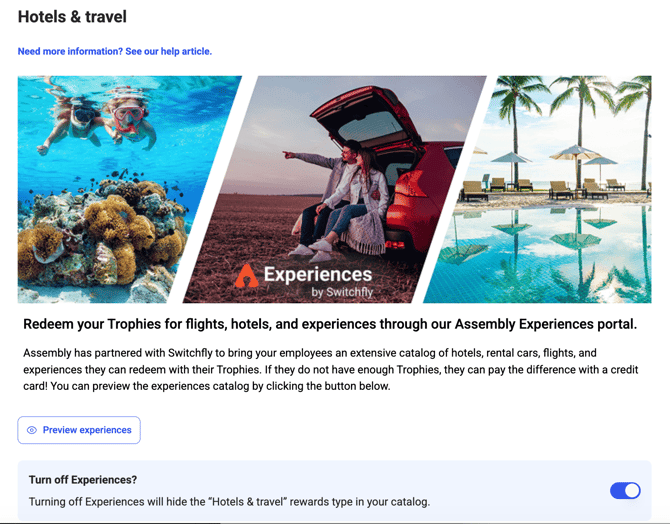
- Select Rewards > Travel & Hotels
- Turn the toggle on to enable
- Click 'Preview experiences' to see the available catalog
- Turn the toggle off anytime to disable
Browsing and Redeeming Experiences
- Click Recognition, then click 'Rewards' in the left menu within Assembly
- Select 'Travel & Hotels'
- Click 'Browse and redeem'
- You'll be taken to the Switchfly catalog where you can search, book, and pay with points or credit card
Using Credit Card Plus Points
When checking out, employees can pay with a combination of credit card and points if they don't have enough points alone.

Cancellations and Refunds
Cancellations and refunds are subject to the terms of the purchase and are controlled by Switchfly, not Assembly.
- To initiate a cancellation, go to your rewards page and select 'Experiences'
- Click 'Browse and redeem experiences'
- Click 'Your trips' in the top right menu
- Manage your trip from there
- If successfully cancelled, points are automatically refunded to your earned balance
- If a credit card was used, the amount is refunded to the card
Frequently Asked Questions
How long does it take to book a trip?
You can book instantly through the Switchfly interface. Confirmation details will be sent to your email.
Can I use only points, or do I need a credit card?
You can use points alone if you have enough. The credit card option is available only if you need to cover the difference.