
Last Updated: June 15, 2026
In this article:
Note: As Assembly features are being incorporated into Quantum Workplace, some users may see a slightly different experience than what is described in this article. The content below reflects the Quantum Workplace Rewards & Recognition platform experience.
Overview
On free plans, all gift cards are enabled by default. On paid plans, you can control which gift card brands are available for employees to redeem. This guide walks you through enabling, disabling, and managing your gift card catalog.
Enabling Gift Card Rewards
- Click here to navigate to Assembly gift card administration
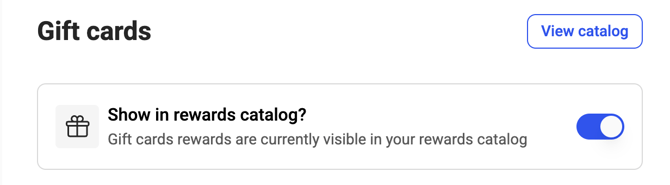
- Enable the 'Show in rewards catalog' toggle at the top of the page
- This allows employees to access gift card rewards from the Rewards catalog
- To remove gift cards completely, disable this toggle
Managing Gift Card Availability
Turn All Gift Cards On/Off
- Click here to navigate to Assembly gift card administration
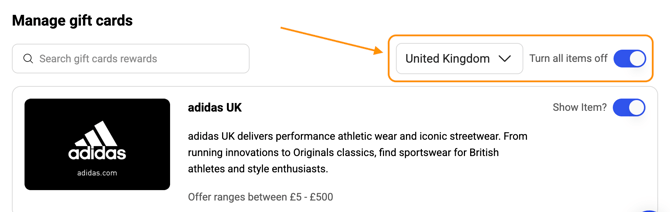
- Select 'All countries' from the country dropdown
- Enable or disable the 'Turn all items on' toggle
- When disabled, all gift cards are turned off for all countries, and the gift cards page is automatically removed from your rewards catalog
Turn Gift Cards On/Off by Country
- Click here to navigate to Assembly gift card administration
- Select the specific country from the country dropdown
- Enable or disable the 'Turn all items on' toggle
- When disabled, all gift cards are turned off for that country only
- Gift cards enabled for other countries remain available
Turn Specific Gift Cards On/Off
- Click here to navigate to Assembly gift card administration
- Select the country from the country dropdown
- Toggle individual gift cards on or off in the list
- Even if 'Turn all items on' is enabled, you can disable individual gift cards and they will remain disabled
Important Notes
- Gift cards are country-specific and must match the recipient's location. For example, don't send USD gift cards to recipients in Spain
- By default, employees see gift cards for their detected country, but can toggle to other countries if available
- Changes take effect immediately for all employees
Frequently Asked Questions
Can employees redeem gift cards internationally?
Gift cards are only valid in the country where the currency is accepted. Employees should select gift cards that match their country.
What if I turn off all gift cards?
The gift card page will be removed from your rewards catalog, and employees won't see gift cards as a reward option.