
Last Updated: June 15, 2026
In this article:
Overview
Admins can send rewards directly to employees for recognition, celebrations, or any occasion. You can send gift cards, monetary rewards and prepaid cards, or points as rewards.
Recipients receive their rewards via email and can redeem them or use them right away.
Who Can Send Rewards
- Only admins can send rewards
- On free plans, you can send to any recipient; on paid plans, you can only send to employees within your Assembly organization
- On free plans, you must verify your account with the Assembly support team before sending more than $50 total
Reward Types
- Gift Cards: Select from hundreds of brands; send one at a time
- Monetary Rewards & Prepaid Cards: Send cash deposits or prepaid cards; send one at a time
- Points: Send points that recipients can redeem for any reward in your catalog; you can bulk send to multiple recipients
How to Send a Reward
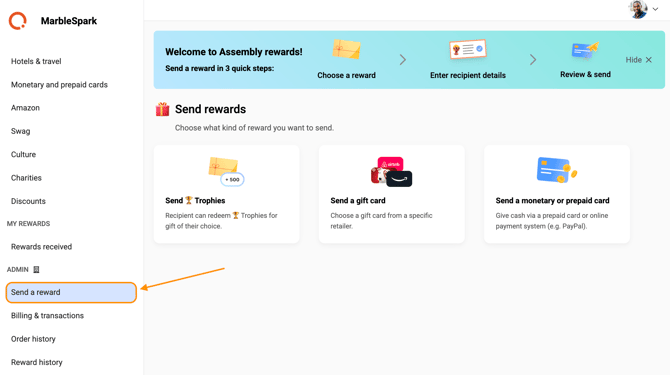
Step 1: Reward Details
- Click Recognition
- Select Rewards in the Assembly left navigation
- Click 'Send a reward'
- Select your reward type: Gift card, Monetary/prepaid card, or Points
- If sending a gift card or monetary reward, select the specific reward from the catalog
- Select the reward value
- Select the recipient(s)
- Gift cards and monetary rewards: one recipient at a time
- Points: send to multiple recipients (or use groups if enabled)
- Optionally, check the 'CC sender email' box to receive a copy of the reward email
- Add the sender name as it will appear in the email
- Click 'Customize card'
Step 2: Customize the Reward
- Select the occasion, or input a custom occasion
- Choose an image from the catalog or upload your own
- Review and edit the pre-generated message
- Enter the sender name that will appear in the recipient's email
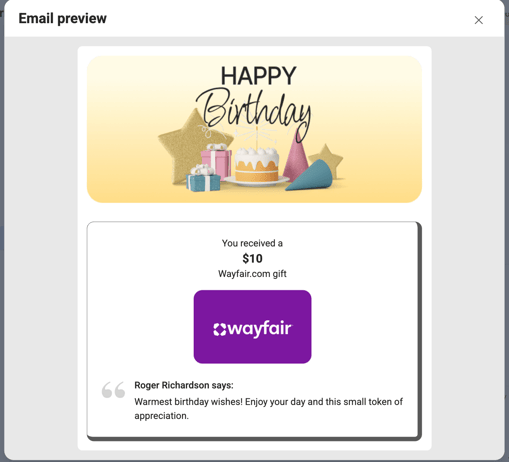
- Click 'Preview email' to see how the recipient will receive it
- Click 'Send test email' to test the reward email first (optional)
- Click 'Review' to continue
Step 3: Review and Send
- Confirm all reward details are correct before sending
- Note payment timing:
- Points: No payment processed now; you'll be charged when the recipient redeems
- Gift cards & monetary rewards: You'll be charged immediately upon sending
- On paid plans, you'll be billed through your normal rewards billing settings
- On free plans, enter or select your payment method
- Click 'Send reward'
Important Notes
- Gift cards and monetary rewards are non-refundable and cannot be cancelled once sent
- Recipients receive rewards directly to the email you specify
- When you send points, recipients can choose which reward to redeem them for
- If sending internationally, ensure the currency is valid in the recipient's country
Frequently Asked Questions
Can I send a reward to someone outside my organization?
Yes, on free plans. On paid plans, you can only send to employees within your Assembly organization.
What happens if a recipient doesn't redeem points?
Points don't expire. Recipients can redeem them whenever they're ready.
Can I send different reward values to different people?
For gift cards and monetary rewards, you send one at a time with one value. For points, you can bulk send different amounts to different recipients.