
Last Updated: June 16, 2026
In this article:
Note: As Assembly features are being incorporated into Quantum Workplace, some users may see a slightly different experience than what is described in this article. The content below reflects the Quantum Workplace Rewards & Recognition platform experience.
Overview
Assembly's recognition system uses points to acknowledge and celebrate your team. Your giving allowance determines how many points you can give each month, while your earned balance accumulates points you receive from recognition.
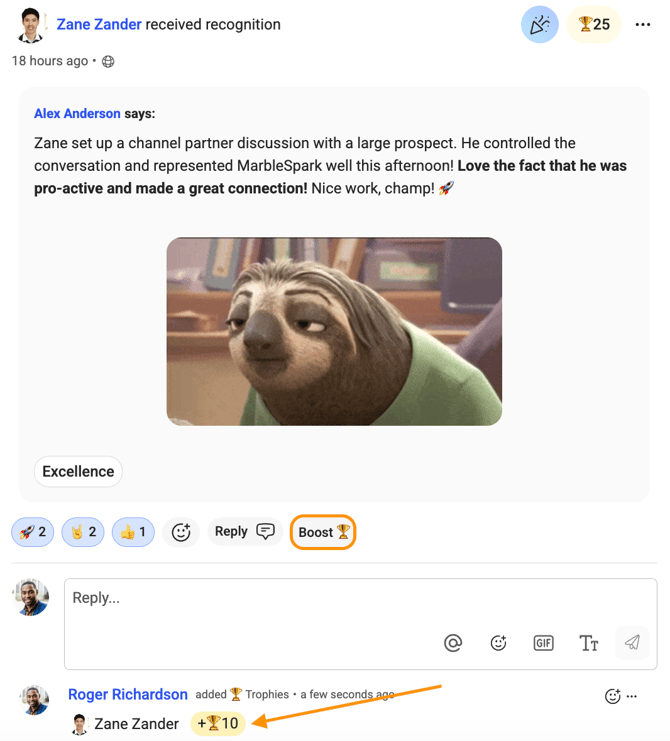
When enabled by your admin, you can boost any post with extra points in your reply, even if you've already given all your monthly points. Learn how points work and how to maximize your recognition culture.
How Points Work
Giving Allowance vs. Earned Balance
Assembly gives you two separate point balances:
- Giving allowance — points you can give to others each month (resets monthly)
- Earned balance — points you accumulate from recognition you receive (does not expire)
Monthly Giving Allowance
Your admin sets your monthly giving allowance. This is the total number of points you can give during a calendar month. Once you've used all your giving points, you cannot give additional recognition with points until your allowance resets the following month. However, you can still give recognition without adding points.
Earned Balance
Points you receive from others (recognition, boosts, automated celebrations, awards) are added to your earned balance. You can redeem earned points for rewards. Earned balance does not expire and carries over month to month.
How Recognition Posts Award Points
When you give recognition to someone, your admin determines the point value for that post. Typically:
- Recognition posts award a set number of points (e.g., 50 points)
- You decide the point split if giving to multiple recipients
- Points are deducted from your giving allowance
- Points are added to the recipient's earned balance
The Boost Feature
What Is a Boost?
A boost allows you to add extra points to your reply on any recognition, birthday, anniversary, welcome, or award post. This is a great way to show extra appreciation to your teammates—and you can boost even if you're out of giving points for the month.
Who Can Use Boosts?
Boosts are available to all employees unless:
- Your admin has disabled boosting in recognition settings
- You have a "giver" or "observer" role (these roles cannot give boosts)
How to Boost a Reply
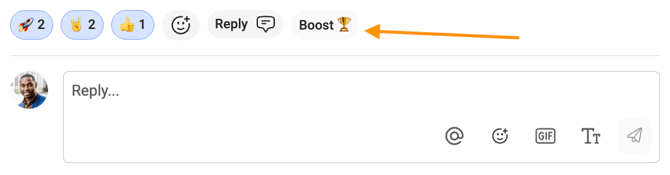
- On any recognition, birthday, anniversary, welcome, or award post, click the Boost button in the reply bar
- By default, all post recipients are pre-selected; remove any by clicking the X in their chip
- Add other recipients by clicking the + icon
- Enter the number of points you want to give
- Hit Space, Tab, or Enter to confirm the point value
- Enter an optional message to accompany your boost
- Click Post to post your boost
Recipients are notified when they receive a boost, and the points are added to their earned balance.
Boost Limits
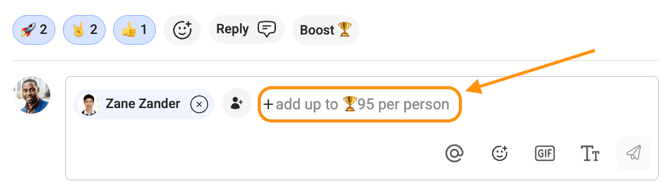
- You must have giving allowance remaining to give a boost
- If your org has maximum giving percentages set, the same limits apply to boosts
- If your org hides points from recognition posts, boost points are only visible to the giver, recipient, and admins
Editing and Deleting Boosts
You cannot edit a boost after posting. You must delete your reply and post it again with the modified boost.
If you delete a reply with a boost:
- As a non-admin: points are automatically returned to your giving allowance
- As an admin: you can choose to let the recipient keep the points or have them returned to your allowance
Boosts in Flows
Boosts are available in flows created by users with permission to give points. If the flow creator loses this permission, the boost option will no longer display, but previously given boosts remain in earned balances.
Giving Recognition Without Points
Recognize Your Team Without Using Points
Once you've used your monthly giving allowance, you can still give recognition and shout-outs to your peers without points. Follow the same process as normal recognition:
- Click Give Recognition on your Assembly dashboard or in a flow
- Select the person or people you want to recognize
- Write your shout-out message (add emojis or GIFs for fun)
- If your company uses core values, select the value that aligns with your praise
- Click Post
Your recognition will appear in the feed without any points. The recipient still sees your praise and appreciation—points are optional, not required for meaningful recognition.
FAQs
Can I carry over unused points from last month?
No. Your giving allowance resets at the beginning of each month. Unused points do not carry over. However, earned points (points you receive) do not expire and carry over indefinitely.
What if I boost someone I already gave points to in the same post?
You can boost anyone, even if you already gave them points in your main recognition. Boost points are separate and added to their earned balance on top of the original recognition points.
Can admins boost?
Yes, admins can boost like any other employee, as long as boosts are enabled in recognition settings.
What happens if I run out of giving allowance mid-month?
You cannot give recognition with points until your allowance resets the following month. However, you can still give point-free recognition and shout-outs to your team.
How much can I boost in a single reply?
Boost amounts are determined by admins within your organization.
Are boosts visible to everyone?
Yes, unless your admin has configured recognition settings to hide points from posts. In that case, boosts are only visible to the giver, recipient(s), and admins.