
Last Updated: October 22, 2026
In this article:
- Overview
- Configure Recognition Approvals
- Choose Recognition Approvers
- Review Pending Recognition
- View Recognition Approval History
- FAQs
Overview
Recognition Approvals allow your organization to review recognition before it's shared in the Recognition feed. Admins can configure approval requirements for external and internal recognition, designate approvers, and review approval history.
Configure Recognition Approvals
- Click Recognition in the left navigation
- Select Administration, then select Approvals
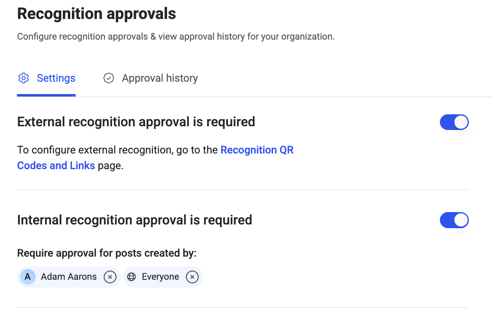
- Toggle on approvals for external and/or internal recognition. External recognition settings are configured under QR Codes and Links.
- Choose who should approve internal recognition
- Save your changes
External Recognition Approvals
If External Recognition is enabled for your organization, you can require approval before externally submitted recognition appears in the Recognition feed.
Turn on External Recognition Approval Required to require review of external submissions.
If this setting is turned off, external recognition can be posted automatically without approval.

Note: We recommend requiring approval for external recognition so your organization can review submissions before they're shared with employees in the Recognition feed.
Internal Recognition Approvals
You can also require approval for recognition submitted by employees within your organization.
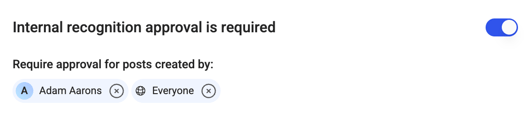
- Enable approval requirements for internal recognition.
- Select the employees or user groups whose recognition submissions should require approval.
- Save your changes.
You can select individual employees, specific user groups, or everyone.
Tip: We typically recommend applying internal recognition approvals selectively rather than requiring approval for all employees.
Choose Recognition Approvers
You can designate who should review recognition submissions that require approval.
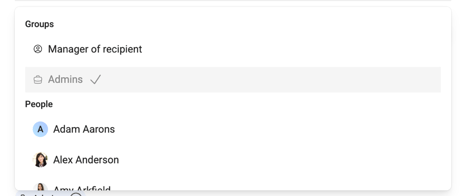
Available approver options include:
- Recipient's Manager: The manager of the employee receiving recognition.
- Admins: Organization admins who are designated to receive approval requests.
Admins can always review and manage recognition approvals, even if they aren't explicitly selected as approvers.
However, admins must be selected as approvers to receive approval notifications and see pending approval indicators.
Review Pending Recognition
When recognition requires approval, designated approvers are notified that a submission is waiting for review.
To review a submission:
- Open your pending recognition approvals.
- Select the recognition submission you want to review.
- Review the recognition details.
- Choose to approve or deny the submission.
Approve Recognition
For external recognition submissions, approvers can make additional selections before posting:
- Add points: Assign recognition points to the recipient or recipients.
- Add a core value: Associate the recognition with an organizational core value.
- Choose visibility: Select whether the recognition should be visible to everyone or remain private.
Select Approve and Post to approve the recognition.
Once approved, the recognition is posted according to the selected visibility settings.
Deny Recognition
If a recognition submission should not be posted:
- Select Deny.
- Enter a reason for the denial.
- Confirm the denial.
The recognition will not be posted to the Recognition feed. The denial reason is saved in the approval history.
View Recognition Approval History
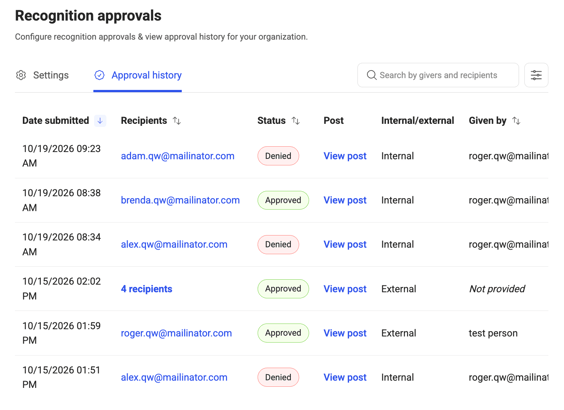
Admins can review previously submitted recognition through the Approval History table.
- Click Recognition in the left navigation
- Select Administration, then select Approvals
- Open Approval History.
- Select a recognition submission to view its details.
Approval History includes both internal and external recognition submissions and allows admins to review information such as:
- Recognition content
- Approval status
- Who reviewed the submission
- Denial reasons, when applicable
Admins can also manage previously approved recognition from the approval history.
Frequently Asked Questions
Can admins approve recognition if they aren't designated as approvers?
Yes. Admins always have access to manage recognition approvals. However, they must be explicitly selected as approvers to receive notifications and pending approval indicators.
Do all internal recognition submissions require approval?
No. You can require approval for specific employees or user groups rather than everyone.
Can external recognition be posted without approval?
Yes. If external recognition approvals are disabled, submissions can be posted automatically.
Can approvers add points to external recognition?
Yes. Approvers can assign points to external recognition before approving and posting it.