
Last Updated: October 15, 2026
In this article:
- Overview
- How to Personalize Survey Communications
- See an Example
- When Demographic Information is Missing
- Important Callouts
Overview
Merge fields allow Admins to personalize survey descriptions, invitations, and reminders using information specific to employees, such as their department or location.
When a merge field is used, Quantum Workplace automatically replaces it with the corresponding information from the employee's profile.
Merge fields can be added to:
- Survey descriptions
- Survey invitation email subject lines and messages
- Survey reminder email subject lines and messages
Available merge fields include Survey Name, First Name, Last Name, and supported standard and custom demographics.
How to Personalize Survey Communications
To add merge fields to a survey:
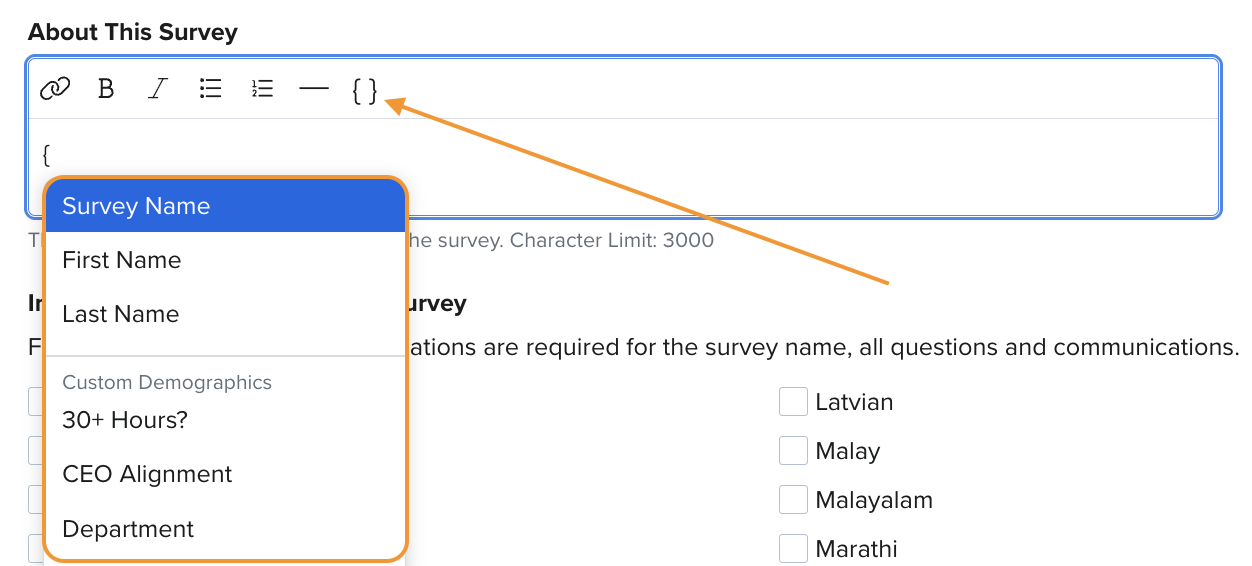
- Navigate to Surveys and create or edit a survey.
- On the Details step of cycle setup, locate the About This Survey description to personalize the survey description.
- Click the { } icon in the text editor or type an opening curly bracket ({) to open the merge field menu.
- Select the merge field you want to include. Options are organized into Standard Demographics and Custom Demographics.
- Continue through the setup and use the Schedule step to add merge fields to invitation and reminder email subject lines or messages, if desired.
- Preview your survey communications to verify how the merge fields will appear to recipients.
You can also add merge fields to translated survey communications on the Language step.
Here's a visual walkthrough:
Example: Personalizing a Survey Invitation
For example, you can use merge fields to personalize a survey invitation based on an employee's name and department.
Without merge fields:
Your Employee Engagement Survey is now open! We encourage you to share your feedback.
With merge fields:
Hi [First Name],
Your Employee Engagement Survey is now open! We'd love to hear about your experience in [Department].
What the employee sees:
Hi Roger,
Your Employee Engagement Survey is now open! We'd love to hear about your experience in Sales.
The employee's information is automatically populated when the invitation is sent.
Preview Merge Fields
You can preview how merge fields will appear to individual employees before launching your survey.
When previewing survey descriptions or invitation and reminder emails, select an employee to see their corresponding demographic values.
You can also send a test email to review how merge fields appear in survey communications.
When Demographic Information is Missing
If an employee does not have a value for a selected demographic, the merge field will appear blank rather than displaying a default value.
For example, if an employee does not have a department assigned, the department merge field will be omitted from their message.
Survey Quality Checks help identify missing demographic information before launch, including:
- Missing values for invited survey participants
- Missing values for active employees who may be added to the survey
- Missing values for external survey participants
Review these notifications before launching your survey to ensure your communications display as intended.
Important Callouts
- Anonymous surveys: Only the Survey Name merge field is supported. Other merge fields cannot be used to personalize anonymous survey communications.
- Shareable links: Surveys using only a public shareable link do not support demographic merge fields. If other invitation methods are also used, demographic merge fields are available.
- Translations: Merge fields can be included in translated survey communications. However, demographic values are displayed in their original language and are not automatically translated.
- Demographic information: Merge fields use current employee demographic information, which may differ from the demographic information captured for survey analytics.