
Last Updated: June 16, 2026
In this article:
Note: As Assembly features are being incorporated into Quantum Workplace, some users may see a slightly different experience than what is described in this article. The content below reflects the Quantum Workplace Rewards & Recognition platform experience.
Overview
This article is for Assembly admins.
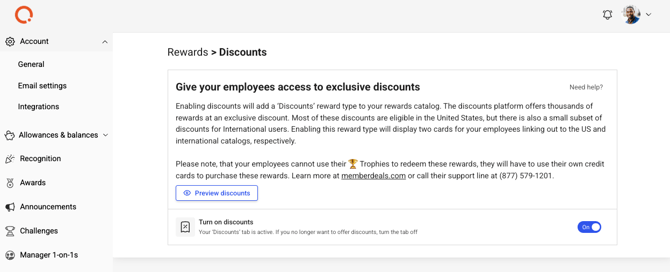
Assembly partners with memberdeals.com to offer your employees access to thousands of items at discounted prices. Employees can browse and purchase from memberdeals.com directly, and Assembly simply provides the gateway to the platform.
Note: Discounts are managed entirely by memberdeals.com. Assembly does not control offerings, pricing, or availability.
Requirements
- Only admins can enable the Discounts reward type
- When enabled, all employees have access
How It Works
- Employees cannot redeem points for discounts
- They must use a credit card to purchase discounted items
- Purchases are not managed in Assembly, but directly through memberdeals.com
- Discounts primarily cover US items, with a section for international discounts
Enabling Discounts
- Navigate to Assembly admin here
- Click 'Rewards' in the left navigation, then click 'Discounts'
- Turn the 'Discounts' toggle on
- All users in your Assembly will see 'Discounts' in their Rewards catalog

How Employees Purchase Discounts
- Click Recognition and Rewards in Quantum Workplace
- Click 'Rewards' in the left navigation in Assembly
- Select 'Discounts'
- Click 'Browse discounts'
- You'll be taken to memberdeals.com
- Browse, select, and purchase items using a credit card
- Confirmation email sent to the email you use
Frequently Asked Questions
Can I use points for discounts?
No. Discounts are credit-card only. This is different from other reward types where points are used for redemption.
How are disputes or returns handled?
All issues with memberdeals.com purchases are handled directly with memberdeals.com. Check your confirmation email for their customer service contact.