
Below are answers to common questions about the Quantum Workplace Best Places to Work survey process, including logging in, survey confidentiality, reminders, and employee list updates.
If you don’t see your question answered here, please contact our team and we’ll be happy to help.
FAQs
- I can’t log into my account.
- Please make sure you have a Quantum Workplace Best Places to Work login. This login is separate from the journal; they do not sync.
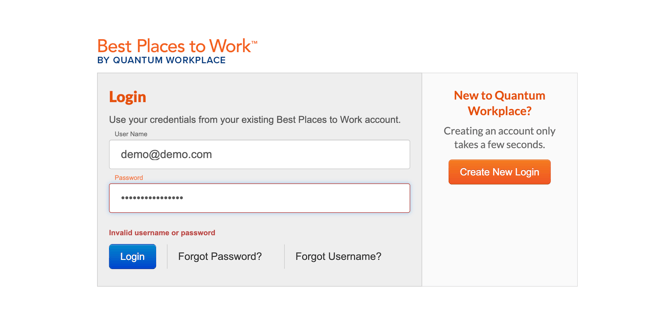
- Please make sure you have a Quantum Workplace Best Places to Work login. This login is separate from the journal; they do not sync.
- When I log in, I see last year’s results.
- Logging out, clearing your cache, and logging back in usually resolves this issue, but if you are still not able to login after following the steps above, please send us an email.
- When I was setting up the survey, I submitted the wrong number of eligible employees. How can I change that number?
- Please email us for assistance.
- Is the survey confidential?
- The Quantum Workplace employee survey is strictly confidential. Companies will have access to survey results at the aggregate level to help you understand and build engagement.
- Can I see who has not completed their survey so I can reach out to them or send them another reminder?
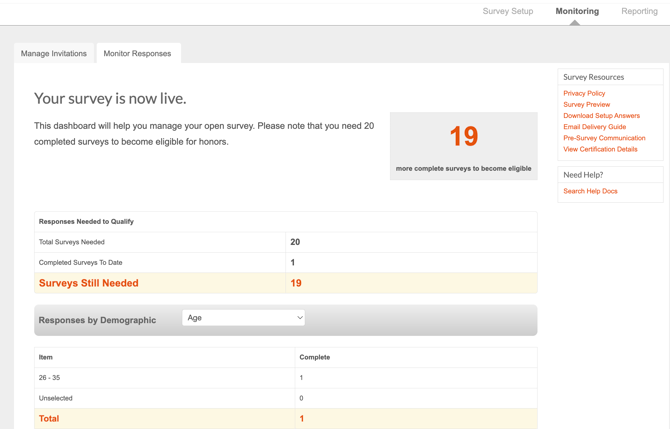
- Due to confidentiality, you can only see the number of completed surveys in your Quantum Workplace portal.
-
Note: We are unable to share which employees have or have not taken the survey. However, employees will only continue to receive reminder notifications if they have not completed the survey. If someone continues to receive reminders, it likely means the survey has not been fully submitted. In some cases, an employee may begin the survey but exit before completing it, which will also trigger continued reminders.
- Can I change the reminder schedule?
-
Reminder emails cannot be modified. However, you do have the option to stop sending reminders and/or opt to send your own additional reminders whenever you would like.
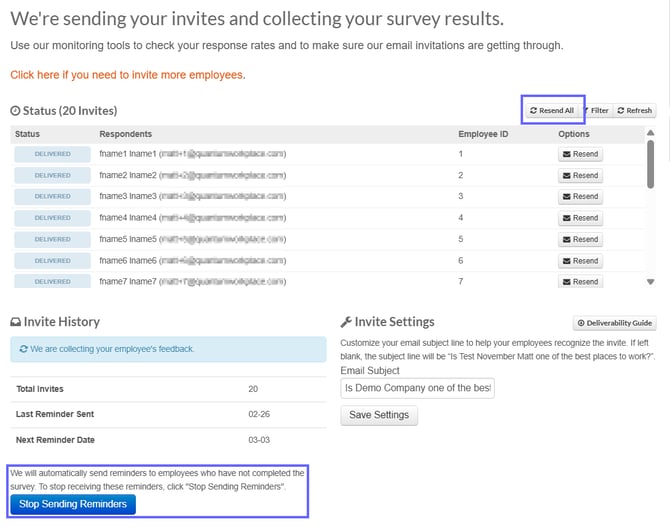
- In your portal, turn off the automatic reminders by clicking "Stop Sending Reminders" shown in blue.
- Also, utilize the "Resend All" button to send reminders to those who have not taken their survey.
-
-
- Someone has left the company or been terminated. Can I remove them from our survey?
- If someone has not completed the survey, they can be removed. We cannot confirm whether they have or have not completed the survey due to confidentiality. Please email us to move forward with this request.
- An employees email address changed, how can I update this?
- Please do not add them again as this would duplicate the employee and add to your employee count making it inaccurate. Please email us to help you edit this.
- Why can’t I just send one link to my employees to take the survey? What if we cannot provide email addresses?
- Each employee receives their own unique link to take the survey, so there is not an organizational code, and one link cannot be sent. (Exception: Companies with over 1,000 employees can utilize one shared link. If this applies to you, please email us here.)
- If your employees do not have email addresses, refer to the following options:
- Option 1: Paper surveys are available at a cost of $3 per submitted survey. A company may use a combination of paper and online surveys for their employees. Paper surveys must be postmarked by the date outlined in the Quantum Workplace portal. Data entry of paper surveys must be conducted by Quantum Workplace.
- Option 2: During your employee upload, you can send us a list of names, and we can send you a pdf file for an instruction sheet for each person to receive to log in and complete their survey.
- Option 3: During your employee upload, you can send us a list of names, and we will send you back an Excel file and you can do an internal mail merge, and each employee would receive their own unique link to complete their survey.
-
Can our organization enter more than one Best Places to Work contest?
-
Yes. Your organization can use the same survey to enter multiple Best Places to Work contests, including regional and national contests, as long as it meets each contest's eligibility requirements. Your organization will only be entered once per regional contest. For less-common combinations of national contests, we recommend confirming the current contest rules before entering.
-
-
Our Benefits score is showing as 0. Does that hurt our results?
-
No. Benefits questions are only asked — and only scored — as part of the Inc. Magazine application. For regional contests, that portion of setup is skipped for Quantum customers, so a 0 simply means no benefits data was collected and has no effect on eligibility or your regional score.
-
- Are remote employees eligible to participate, and which contest do they count toward?
- Yes, remote employees can be included, with a few conditions: they must be based in the U.S., and they count toward the contest region tied to the office they report to or are physically closest to. If your organization has a physical office in a contest area, remote employees anywhere can be counted there.
- If you don't have a physical office in the contest area, only remote employees who actually live in that contest's county area are eligible. A remote employee can only be counted in one regional contest at a time.
-
What survey response rate do we need to be eligible?
- Required response rates are based on the number of eligible employees invited to the survey — not your total company headcount.
- 9 employees or fewer needs 100% response; 10–24 needs 85%; 25–49 needs 80%; 50–99 needs 70%; 100–149 needs 65%; 150–249 needs 50%; 250–499 needs 40%; 500–999 needs 30%; 1,000–2,999 needs 15%; 3,000–4,999 needs 8%; more than 5,000 needs 5%. Only Inc. and the Sports contest allow fewer than 10 eligible employees.
- What does it cost to enter the Inc. Magazine Best Workplaces contest, and can that data move to a regional contest?
-
Companies pay Inc. Magazine directly to apply and Quantum Workplace does not have insight into their current rate. Yes, Inc. survey data can typically be transferred to a regional contest afterward if a list of regional-eligible employees is provided.
-
- How long is our engagement survey data valid for contest entry?
- Survey data is valid for up to 12 months, and that rule applies across all BPTW programs (regional and Inc.). So, if your survey closes outside the current year's contest window, the data can typically be applied to next year's contest instead.
- When will we find out the results?
- Notifications usually go out about 4 weeks after your contest's survey closes. Exact notification dates are set by each region's business journal and are subject to change.
-
Are owners or executives excluded from participating?
- Anyone with more than 5% ownership in the company is excluded from participating.
- Which counties/cities count toward a specific contest region?
-
You can find the details of which cities or counties are included in a specific contest region here.
-
- How is our Best Places to Work score actually calculated?
- Only the 39 (or 40, including the diversity & inclusion item) scaled survey questions count toward your score. Responses are averaged on a 6-point scale, then converted to a 100-point scale, and your organization is ranked against others in your size category for that region. A minimum score is in place to be eligible for submission, on top of the region/category-specific cutoff. For more details, contact our support team.
- What does it cost to participate in BPTW if we're not on an Engagement (subscription) plan?
- Pricing depends on your company size and which report tier you choose, and is subject to change. We recommend contacting support for more information.
- Is there a revenue cap to enter Inc. Magazine's Best Workplaces contest?
- Yes — Inc.'s contest has a $1 billion annual revenue cap (and is U.S. employees only). Regional contests do not have a revenue cap.
- Can we withdraw from a contest after we've already registered?
- Yes — reach out and the BPTW Support team can opt your organization out on your behalf.
- I have a billing question. Who should I reach out too?
- For all billing and invoice questions, please reach out to our Support team at bestplaces@quantumworkplace.com