
Last Updated: June 16, 2026
In this article:
- Overview
- Who Can Use This Feature
- Connection Types
- Key Features
- Setting Up Amazon Rewards
- Finding Your Group ID and Identity
- Enabling Amazon for Employees
- How Employees Redeem
- Important Notes
- Editing Your Connection
- FAQs
Note: As Assembly features are being incorporated into Quantum Workplace, some users may see a slightly different experience than what is described in this article. The content below reflects the Quantum Workplace Rewards & Recognition platform experience.
Overview
Assembly integrates with Amazon Business to let employees redeem points for products from your company's Amazon Business catalog. You can set up one of three connection types depending on your needs.
Who Can Use This Feature
- You don't need an Amazon Business account to offer Amazon rewards (though you can connect to one if you have one)
- Only admins can set up, edit, and disconnect Amazon
- We support Amazon Business in the United States and Canada
Connection Types
Assembly offers three connection setups:
Simple Setup
- No Amazon Business account required
- Available through your account manager
- Employees can browse US and Canada (coming soon) stores
- Returns and cancellations processed by Assembly (additional cost applies)
- Order emails sent by Assembly
Single Admin Connection
- Requires your own Amazon Business account
- Admin must be registered as an admin in your Amazon Business account
- All orders placed through a single admin's account
- Employees cannot return or cancel orders directly
- Order emails sent by Assembly
- Billing charged directly through Amazon
Multi-User Connection
- Requires your own Amazon Business account
- Admin must be registered as an admin in your Amazon Business account
- Employees place orders through their own individual accounts
- Employees can return or cancel orders themselves
- Order emails sent by Amazon
- Billing charged directly through Amazon
Key Features
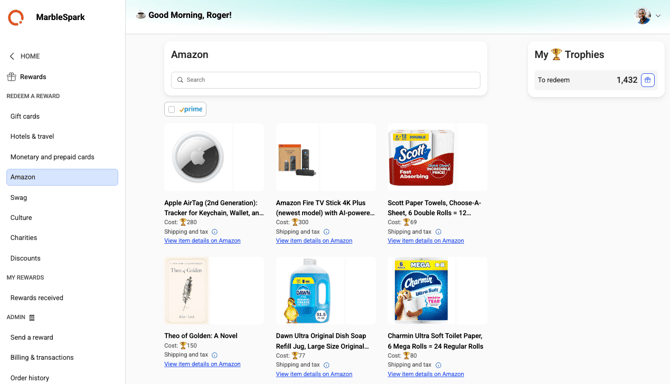
- Point conversion: $0.10 = 1 point
- Browse all items in your Amazon Business catalog
- Prime-eligible items available if you have Business Prime
- Taxes and shipping calculated at checkout
- Use credit card + points if you don't have enough points alone
- Shipping limited to the country where your store is located
Setting Up Amazon Rewards
Before You Connect
For Single Admin and Multi-User connections:
- Set up an Amazon Business account here (if you don't have one)
- Configure Assembly as your purchasing system in your Amazon Business account:
- Go to Amazon Business settings > User management > Groups
- Select your group and go to Systems integrations > Purchasing system
- Select Assembly and set status to Active
- For Multi-User connections, whitelist your company domain in Amazon Business:
- Go to Amazon Business settings > Systems integrations > Domain verification
- Add and verify your company domain
Connect to Amazon in Assembly
- Click Recognition and Rewards in Quantum Workplace
- Select your profile picture
- Click Recognition and Rewards Settings
- Click Rewards in the left navigation in Assembly
- Select Amazon
- Click Connect next to the country where your store is
- Follow the on-screen instructions and authenticate with Amazon
- Select the Amazon Business group for your employees
- Enable 'Create new Amazon Business user accounts' to auto-add employees
- Enter your Group ID and Purchaser Email to complete setup
Finding Your Group ID and Identity
Group ID
- Go to Amazon Business settings > Members > Groups
- Select your group
- Copy the Group ID from the URL
From Identity in cXML
- Go to Amazon Business settings > Members > Groups
- Select your group
- Go to System integrations > Purchasing system
- Copy the 'From Identity' in cXML
Enabling Amazon for Employees
By default, the Amazon tab is turned off.
- Click Recognition and Rewards in Quantum Workplace
- Select your profile picture
- Click Recognition and Rewards Settings
- Click Rewards in the left navigation in Assembly
- Select Amazon
- Turn the toggle next to 'Show the Amazon tab' to on
How Employees Redeem
- Click Recognition in Quantum Workplace
- Click 'Rewards' in Assembly
- Select 'Amazon'
- Search for products (note: Amazon filtering is limited in Assembly, so we recommend searching on Amazon first, then searching by product name in Assembly)
- Select an item
- Confirm you have enough points (taxes and shipping affect final cost)
- Complete checkout with points or points + credit card
Important Notes
- You cannot connect multiple Assembly accounts to the same Amazon Business account
- Employee email domain must be whitelisted for Multi-User connections
- Inventory and pricing are controlled by Amazon and may vary by size/color
- Points cannot be combined with credit card; use one or the other, unless using experiences or travel rewards where combination is allowed
Editing Your Connection
- Click Recognition and Rewards in Quantum Workplace
- Select your profile picture
- Click Recognition and Rewards Settings
- Click Rewards in the left navigation in Assembly
- Select Amazon
- Click Edit Connection
- Update Group ID or Purchasing Email as needed
- Click Save Changes
- To disconnect, click Disconnect
Frequently Asked Questions
Can employees see items from multiple countries?
No, items are country-specific. You can connect both US and Canada stores, and employees will see the store for their detected location.
What happens if an item goes out of stock?
If an item is unavailable in the selected size/color, you may encounter an error message. Check Amazon directly for availability.