
Last Updated: June 16, 2026
In this article:
- What is AI Reporting & Insights?
- Getting Started
- Reporting Categories & Available Data
- Understanding Activity Access Levels
- Missing Employee Profile Information
- AI Disclaimer
- FAQs
Note: As Assembly features are being incorporated into Quantum Workplace, some users may see a slightly different experience than what is described in this article. The content below reflects the Quantum Workplace Rewards & Recognition platform experience.
What is AI Reporting & Insights?
Assembly's AI Reporting & Insights solves a common challenge: extracting meaningful data from your employee recognition platform without spending hours filtering and downloading reports. With Dora AI, you can generate a report instantly by simply asking a question.
Whether you need recognition trends, reward redemption patterns, milestone data, or usage analytics, Dora delivers with visualizations, charts, and downloadable spreadsheets.
You can ask Dora for trends, request specific data visualizations, drill down into details, and customize reports on the fly. No complicated queries required!
Getting Started
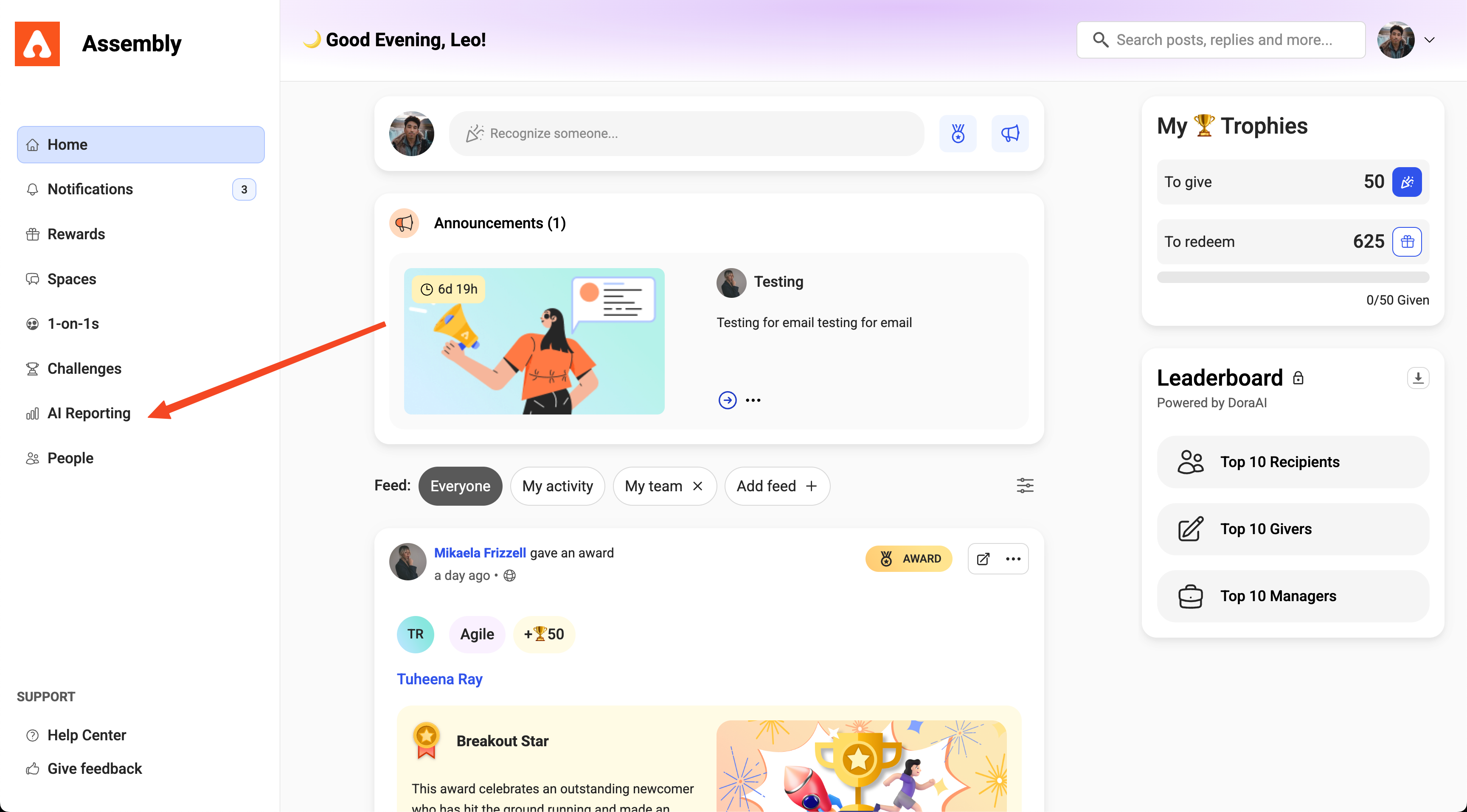
AI Reporting & Insights is available exclusively to workspace admins. Here's how to access Dora:
- Click Recognition and Rewards in Quantum Workplace
- Select your profile picture in Assembly
- Click Recognition and Rewards Settings
- Select AI Reporting & Insights from your left navigation menu in Assembly.
- Choose a reporting category (see the section below for available categories).
- Use the suggested prompts at the bottom of the chat window, or ask Dora your own question.
- Dora will generate your report instantly with visualizations, tables, or downloadable data.
Reporting Categories & Available Data
Dora organizes data into three main reporting categories. You can ask questions specific to any category, or ask general questions about user data (such as team members, point balances, hire dates, and last login dates) across all categories.
Recognition Stats
View all peer-to-peer recognition activity, including recognition posts and boosts given in comments. This category captures sender and recipient details, points given, core values recognized, and the full text of each recognition post.
Example questions you can ask Dora:
- Who are our top recognition givers and receivers this month?
- Which teams have received the most and least recognition?
- Are there managers who haven't recognized their team in the last month?
- Show me a chart of month-by-month recognition points given over the last year.
- How does per-month recognition received change based on an employee's tenure?
- Display the last 5 recognition posts given to a specific manager by their team members.
- Has [employee name] received any recognition since joining?
Reward Redemptions
Track all reward redemption activity, including who redeemed a reward, when, the reward type, points spent, and currency value of the redemption.
Example questions you can ask Dora:
- What are our most and least popular rewards?
- How many total points exist in our employees' balances, and what's the currency value?
- How many points were spent on rewards over the last year?
- Which department has redeemed the most rewards?
Milestones
View employee milestones including birthdays and work anniversaries, filtered by date, department, or location.
Example questions you can ask Dora:
- Show me all birthdays coming up in the next 2 months.
- Are there any birthdays or anniversaries in the Engineering department in July?
- Which employees in New York have birthdays in August?
- How many employees have a 5-year work anniversary coming up in 2025?
Understanding Activity Access Levels
Your ability to view specific user activity in reports depends on your access level in Dora Reporting.
Admin Level Access
If you are an Admin or a Manager with Admin-level access in Dora Reporting, you have full visibility across all activity within your workspace. You can:
- View activity for any user in your workspace.
- View private posts between any users.
This access level helps you oversee engagement trends and ensure participation goals are being met.
Org Level Access
If you are a Manager without Admin-level access, your visibility is limited to your reporting tree. You can:
- View activity only from users within your reporting tree (your direct reports and anyone reporting under them).
- Cannot view activity for users outside your reporting hierarchy.
This ensures managers can monitor and encourage their team's participation while maintaining privacy across other departments.
Missing Employee Profile Information
If your Assembly workspace is missing employee profile data—such as departments, locations, job titles, or manager assignments—you may see a notice inside Dora AI Reporting.
You can still generate many valuable insights, but your reporting flexibility will be limited. For example, if your workspace lacks department data, you won't be able to compare departmental trends.

To unlock full reporting capabilities, update your employee profile information in the User Management section of the Admin panel. Depending on how you manage users, you may need to email us for assistance.
Recommendation: Use an HRIS integration for the easiest user management experience. This keeps employee data current and enables more detailed reporting.
AI Disclaimer
Assembly's AI Reporting & Insights uses advanced AI technology to generate accurate, actionable reports. However, like all AI systems, Dora may occasionally make mistakes. For business-critical decisions, we recommend downloading your AI-generated report, reviewing it carefully, and verifying key data points before acting on the insights.
FAQ
Who can access AI Reporting & Insights?
Currently, AI Reporting & Insights is available exclusively to workspace admins. Managers with Admin-level access in Dora Reporting can also use the feature, though their access to specific user activity will be limited to their reporting tree.
Can I ask Dora any question about my Assembly data?
You can ask questions about data within your chosen reporting category, as well as general user data questions (team members, point balances, hire dates, last login) across all categories. For best results, be specific and natural—ask the way you would ask a human analyst.
What if my data seems incomplete?
If you're missing employee profile information (departments, job titles, locations, manager assignments), Dora will still work, but some analyses won't be possible. Visit your Admin panel's User Management section to add or update employee profiles. If you use an HRIS integration, contact your Account Manager or Success@joinassembly.com for help.
Can I download my reports?
Yes. Dora can generate reports as downloadable CSVs, spreadsheets, or visual formats depending on your request. Simply ask Dora to export your data, and you'll receive a file ready to share or analyze further.